Ureader.com  
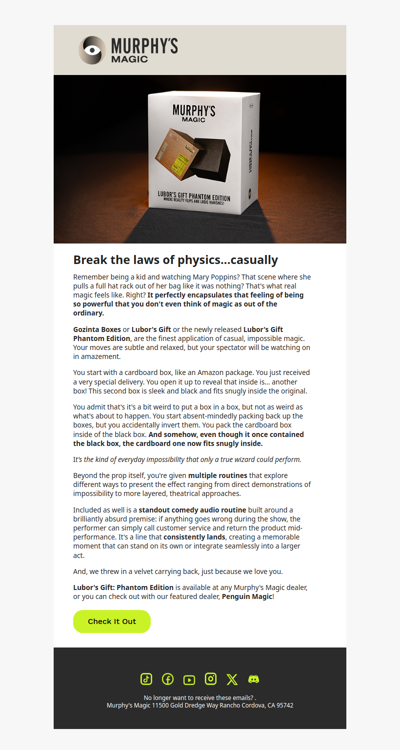
Microsoft software help and Community
   home   |   control panel login   |   archive   |  
 
Word
application.errors
conversions
docmanagement
drawing.graphics
formatting.longdocs
international
internet.assistant
mail
mailmerge.fields
menustoolbars
newusers
numbering
oleinterop
pagelayout
printingfonts
setup.networking
spelling.grammar
tables
vba.addins
vba.beginners
vba.customization
vba.general
vba.userforms
web.authoring
word6-7macros
word97vba
  
 
date: Mon, 27 Oct 2008 15:09:01 -0700,    group: microsoft.public.word.application.errors        back       


Images Flipped (Mirrored) In Different Word Versions   
I have a file with images that I printed to PDF using Mac Office 2008. The 
.DOC looks just fine:
http://img505.imageshack.us/my.php?image=maczo2.jpg
However, when I copied this file to my Vista PC using Windows Office 2008, 
it looked like this:
http://img368.imageshack.us/my.php?image=winzm1.jpg

As you can see, some of the images are mirrored on the vertical axis. This 
occurs sporadically throughout the document. I have no way of fixing these 
images in Word 2008 on Vista. Any ideas what is going on here?
date: Mon, 27 Oct 2008 15:09:01 -0700   author:   James

Re: Images Flipped (Mirrored) In Different Word Versions   
Hi James,

Please see reply to the duplicate question in the MS Word (for Windows) Drawing and Graphics discussion group.

If you have not already done so, you may want to also cover the Office:Mac side of things by posting in the Word:mac discussion
group as well, through the link below.

============
  <<"James"  wrote in message news:5B3BAC28-7859-4A6E-B7F1-8085778E5270@microsoft.com...
I have a file with images that I printed to PDF using Mac Office 2008. The
.DOC looks just fine:
http://img505.imageshack.us/my.php?image=maczo2.jpg
However, when I copied this file to my Vista PC using Windows Office 2008,
it looked like this:
http://img368.imageshack.us/my.php?image=winzm1.jpg

As you can see, some of the images are mirrored on the vertical axis. This
occurs sporadically throughout the document. I have no way of fixing these
images in Word 2008 on Vista. Any ideas what is going on here? <<
-- 
I hope this helps you,

Bob  Buckland  ?:-)
MS Office System Products MVP

  *Courtesy is not expensive and can pay big dividends*

Microsoft Office:Mac newsgroups:

 news://msnews.microsoft.com/microsoft.public.mac.office.word
or
 http://microsoft.com/mac/community/community.aspx?pid=newsgroups

Microsoft Office:Mac products and updates
 http://microsoft.com/mac
date: Tue, 28 Oct 2008 00:32:06 -0700   author:   Bob Buckland ?:-\) 75214.226(At Beautiful Downtown)compuserve.com

Google
 
Web ureader.com


    COPYRIGHT 2007, YARDI TECHNOLOGY LIMITED, ALL RIGHT RESERVE  |   contact us